Setting up payroll in QuickBooks is not as complicated as you might think. In this article, we’ll discuss how to set up the program so you can begin making payments immediately.
Once you’ve installed the software, you’ll be able to manage your employees’ information and create reports that will show you the number of hours they’ve worked, as well as their pay schedules.
In addition, you’ll learn how to import data from other programs and take advantage of the tutorials provided by QuickBooks.
How to Set Up Payroll in QuickBooks?
Once you’ve installed QuickBooks payroll, you’ll need to create a new employee profile. It’s important to set up a user account since this is where you will set up the entire system. This will help you avoid having to set up multiple accounts or manually input every employee’s information.
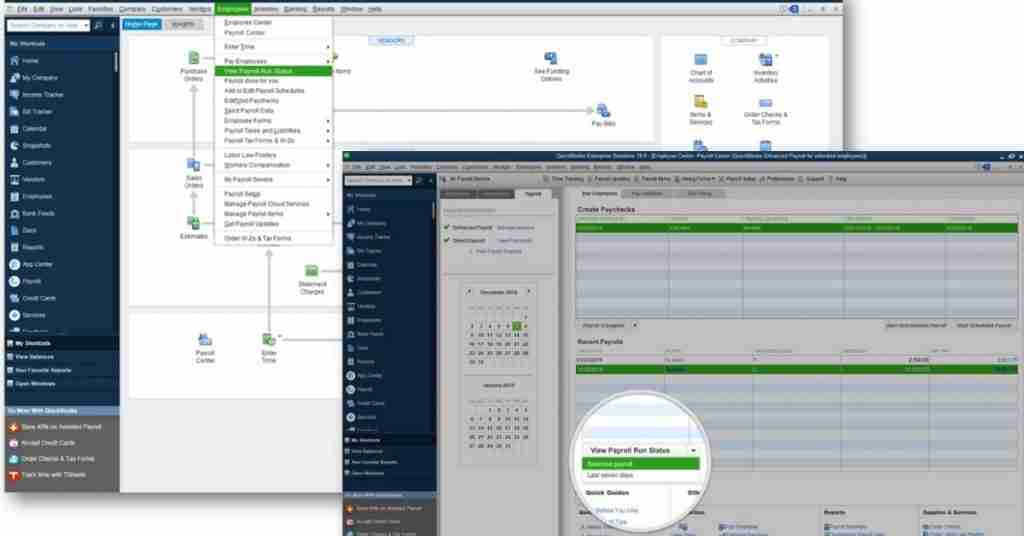
Once the new employee is added, you’ll need to fill out a W-4 form for them, which contains withholding information and other relevant details. You’ll also need to upload a voided check if you plan on doing direct deposit.
Once you’ve set up your employees’ payroll in QuickBooks, you can start the process by entering their personal details. Besides, this will help you calculate taxes and ensure that you are paying the right amount to your employees.
Furthermore, timely payments can motivate your employees to stay in your company for a longer period of time. This is why payroll software is so important for any business. However, if you’re unsure about how to use the program, consult a professional.
Once you’ve finished setting up your employees’ payroll, you can set up your company’s payroll processes. You can choose to process each employee’s pay in different locations. Once you’ve selected the location, you can choose the types of payments you want to make.
For example, if you’re processing employees’ payments in different locations, you should choose the option that will allow you to deposit the money into their accounts. This feature will let you pay all your employees on the same day.
Benefits of QuickBooks payroll
The program has many other benefits as well. First of all, you’ll be able to create multiple pay schedules and list employee contributions. When you hire a new employee, you must fill out a W-4 form with all relevant details.
The software will also automatically calculate tax and calculate your income tax. This way, you won’t have to worry about missing a deadline or miscalculating. And if you’re paying your employees through direct deposit, you won’t have to worry about doing taxes yourself.
You can also use QuickBooks payroll to automate the processing of payroll taxes. Once your employees are enrolled, you’ll be able to set up and print W-2 forms for them. While it’s important to keep track of your employee’s W-2 forms, it’s important to keep them up-to-date.
The software will calculate and file taxes automatically for you. Adding W-2 forms is a simple process, but you’ll still need to make sure you’re keeping track of employee information.
When you’re using QuickBooks Payroll, you will be able to pay your employees without having to remember that it’s payday time again. This is important for all employers because it can boost productivity and morale in the organization.
When you pay employees on time, they tend to be more satisfied with their employer. And this is especially true if you’re an independent contractor. If you’re an independent contractor, you’ll want to ensure you don’t miss deadlines for filing taxes.
Conclusion
In order to use QuickBooks Payroll, you must have a subscription plan to access payroll services. Once you’ve set up your company, you need to configure employees and their payment schedules. In this way, you’ll have a detailed overview of your employees’ information and their pay.
Once you’ve set up your company’s employee information and payroll processes, QuickBooks will offer you expert support and assistance in the setup process. For a small business owner, the best option is to hire an expert.
Read Also
What Is the Manufacturing Account?

taswarh is a contributor at Accountant Log. We are committed to providing well-researched, accurate, and valuable content to our readers.